What You’ll Learn
- What the letters API mean
- How a request and response work
- Where you meet APIs in everyday life
- Why permissions and data sharing matter
A Controlled Connection
API stands for Application Programming Interface. The name is technical, but the job is simple: it gives software a defined way to communicate.
Think of a restaurant server
You choose from a menu and give your order to the server. The kitchen prepares what you requested, and the server brings back the result. You do not walk into the kitchen or need to understand its entire system.
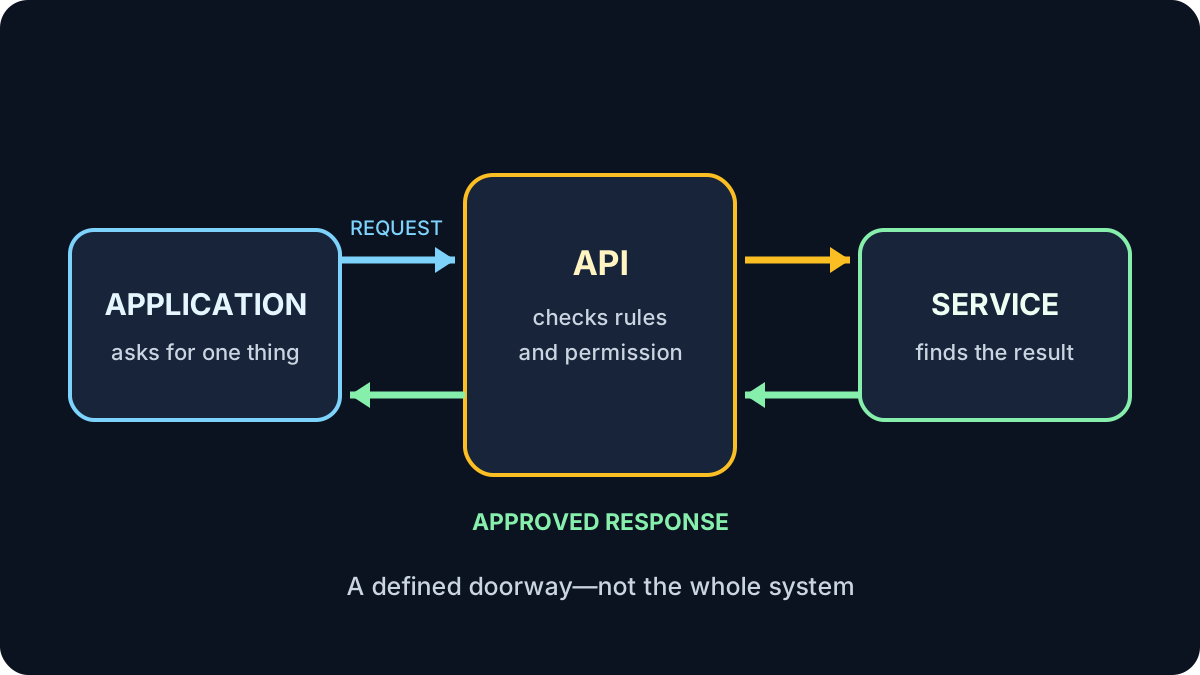
Request, Check, Response
- An application sends a request: “What is today’s weather for Vancouver?”
- The API checks whether the request follows its rules and has permission.
- The weather service finds the requested information.
- The API returns a structured response.
- The application turns that response into the forecast you see.
If the request is unclear, unavailable or unauthorized, the API returns an error instead of the requested result.
APIs You May Already Use
An API is not the whole service
It is the agreed doorway. It exposes particular information or actions while keeping the service’s internal systems separate.
What an API Request Contains
Requests vary, but they commonly identify:
- What action is wanted, such as view, create or update
- Which information is involved, such as one location or booking
- Who or what is asking, often shown by a secure token
- Any limits, such as the date range or number of results
The response usually uses a consistent structure so the receiving software knows which value is a date, name, price or status.
Permissions, Privacy and Trust
APIs make useful connections possible, but a connection should receive only the access it needs.
Read the permission screen
Before connecting an app, check whether it can only view information or can also create, change or delete it. Avoid granting access that does not make sense for the task, and remove connections you no longer use.
A familiar sign-in button does not automatically make the new service trustworthy. Check who operates it, what information it requests and how to disconnect it later.
Try It: Be the API
Imagine a community-centre system with these approved requests:
GET class schedule— returns public class names and timesGET my booking— returns one signed-in person’s bookingCANCEL my booking— cancels that person’s booking after confirmation
What should happen if an unsigned visitor requests GET everyone’s bookings?
Show the answer
The API should refuse the request. It is not on the approved menu, exposes other people’s information and lacks proper authorization. A safe response gives an error without revealing the private records.
Quick Knowledge Check
1. Does an API normally reveal an entire internal system?
Answer
No. It provides defined requests and responses through a controlled interface.
2. What are the two basic parts of an exchange?
Answer
A request and a response.
3. What should you check before connecting two services?
Answer
Check the provider, the requested permissions, the information being shared and how to remove access later.
What to Remember
- An API is a controlled way for software to communicate.
- One service sends a request and another returns a response.
- Maps, payments, sign-ins and weather apps commonly rely on APIs.
- APIs expose selected capabilities, not necessarily the whole system.
- Review permissions before connecting services.
You finished Technology Fundamentals
You can now explain the basic relationship between devices, software, information, cloud services, databases and connected applications.
Review the Technology Fundamentals path →