What You’ll Learn
- How records and fields organize information
- What a database question—or query—does
- How related information avoids unnecessary duplication
- Why accuracy, access and purpose matter
A Structured Collection
A database is an organized collection of information designed for repeated use. Instead of keeping every detail in one long document, it stores similar facts in consistent places.
Think of a digital address book
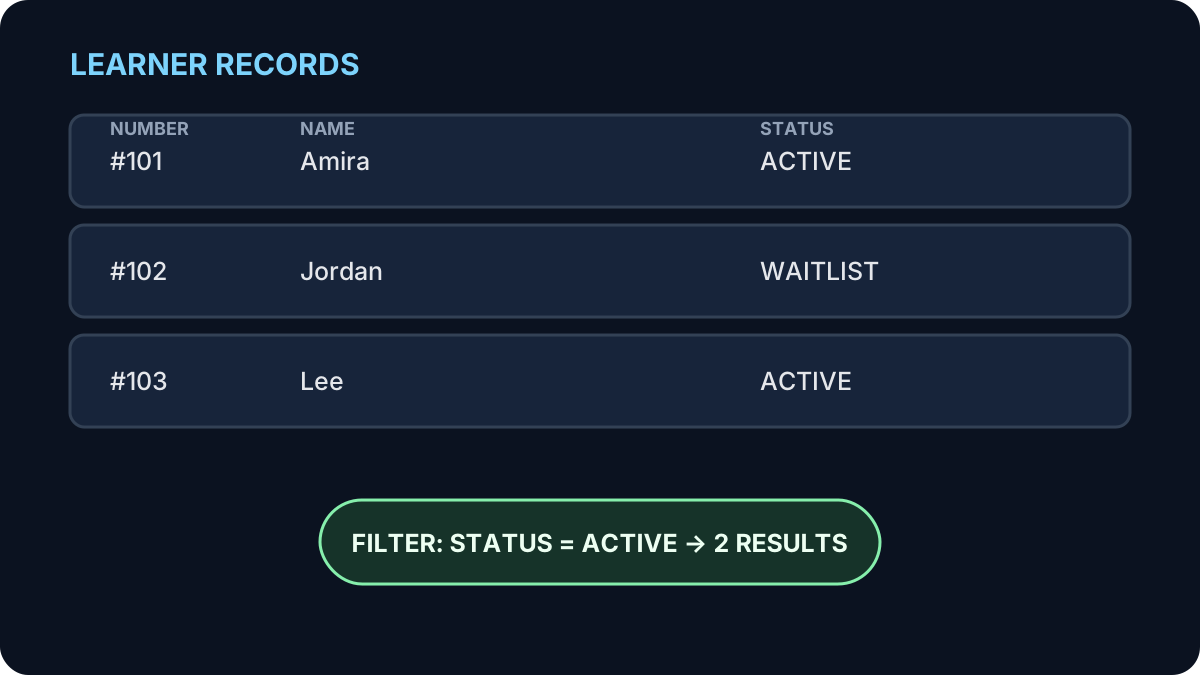
Each person has a record. Name, telephone number and email address are fields. Because each detail has a consistent place, you can search by name or sort the records without reading every entry.
Records, Fields and Values
Databases Answer Questions
A query is a structured request for particular information. You use queries without seeing the technical instructions behind them.
- A shopping filter asks for shoes in a chosen size and price range.
- A library search asks for available books by a particular author.
- A banking app asks for transactions from the last 30 days.
- A registration system asks how many places remain in a class.
Most apps are asking questions
When you search, filter, sort or open a profile, the application often sends a question to a database and presents the matching result.
How Related Information Helps
A system does not need to repeat every detail in every place. It can connect related records using identifiers.
For example, a class booking can link one learner record to one class record. If the learner updates their email address, it changes in the learner record rather than in every past booking.
This reduces duplication, but relationships must be designed carefully. Deleting or changing one record may affect information connected to it.
What Happens When You Select “Add to Cart”?
- The application identifies the product you selected.
- It checks a database for the price and available quantity.
- It creates or updates a cart record connected to your session or account.
- The page displays the updated cart.
- At checkout, other systems handle payment and inventory updates.
The page looks almost instant, but several structured checks and updates happen behind the button.
Good Information Still Matters
A database can be technically well built and still produce poor results if the stored information is incomplete, duplicated, outdated or entered inconsistently.
Access should follow purpose
Not everyone needs every field. A facilitator may need a learner’s name and accommodation request, while a public class listing should not expose either. Collect only what is needed and restrict sensitive information to the people who need it.
Try It: Design a Tiny Database
A community group needs to track workshop registrations. Choose four useful fields from this list:
- Registration number
- Learner name
- Workshop name
- Attendance status
- Favourite movie
- Passport number
Show a sensible answer
Registration number, learner name, workshop name and attendance status directly support the task. Favourite movie is irrelevant. A passport number is highly sensitive and unnecessary.
Quick Knowledge Check
1. What is one complete set of details about a person or item called?
Answer
A record.
2. What does a query do?
Answer
It asks a database for selected information or an action using defined conditions.
3. Does organized data guarantee accurate results?
Answer
No. The information must also be accurate, current, relevant and entered consistently.
What to Remember
- Databases organize information into consistent records and fields.
- Queries find, sort or update selected information.
- Identifiers help connect related records reliably.
- Applications often hide the database work behind familiar buttons.
- Collect only needed information and limit access appropriately.
Next: Cloud Computing
See where remote applications and information run—and what “the cloud” actually means.
Continue to Lesson 4 →